NVIDIA / Ada Lovelace
L4
| Provider / plan | Price / GPU-hour | Rental type | Terms & configuration | Last checked | Provider pricing link |
|---|---|---|---|---|---|
| Vast.aiBest on-demand | $0.1751Updated 2026-11-22 · 15:43 UTCLowest flexible rate | On-demandNo reservation | 1 GPU minimumBelgium, BEView detailsObserved marketplace offer, not a provider-wide list rate. Total hourly quote for one GPU with the API default disk allocation; bandwidth and additional storage can cost extra. One cheapest verified available on-demand offer per GPU is selected; availability can change.
|
2026-11-22Auto-collected | View pricing ↗ |
| Runpodbest-on-demand | $0.69Updated 2026-11-22 · 15:43 UTC | On-demandNo reservation | 1 GPU minimumSee providerView detailsSecure Cloud: lowest public on-demand GPU-hour list rate among enabled clouds. Not a capacity guarantee; storage/networking extra.
|
2026-11-22Auto-collected | View pricing ↗ |
| ModalGPU Tasks | $0.7992Updated 2026-11-22 · 15:43 UTCCPU/RAM: confirm with provider | ServerlessActive GPU time | 1 GPU minimumSee providerView detailsGPU time only; CPU, RAM, storage, region and non-preemptible surcharges are extra.
|
2026-11-22Auto-collected | View pricing ↗ |



Prices are dated listings, not live availability. Compare minimum GPU counts and commitments. Storage, networking and taxes may add charges; CPU/RAM inclusion depends on the provider and is shown beside each serverless rate.
L4 combines a hardware profile with dated rental offers on xpu live. L4 is a compact Ada accelerator with 24 GB of memory and a 72 W power envelope. It targets inference, video processing and graphics in space- and power-constrained servers. Its low board power does not by itself determine the cloud rental price.
L4 specifications and configuration
The catalog records Ada Lovelace architecture, 24 GB of VRAM, GDDR6 memory, PCIe form factor, 300 GB/s memory bandwidth, 72 W maximum board power. These values describe the documented hardware edition. They do not describe the CPU, system RAM or storage of every cloud machine. Open the Specifications tab for the full field-by-field comparison.
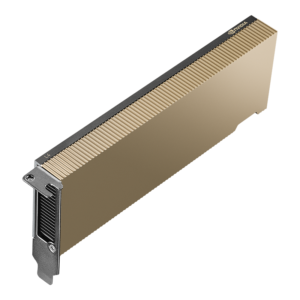
Low-profile, single-slot L4. Do not confuse it with the 48 GB L40 or L40S. Consult the manufacturer specification source when checking the exact edition.
Choosing L4 for your workload
L4 is worth comparing for Video inference and transcoding; Small-to-medium model serving; Power-sensitive inference deployments. Its documented strengths include 24 GB memory in a 72 W envelope; FP8-capable Tensor hardware; Dedicated AV1 video engines. Match those features to the application you intend to run rather than treating a model name as a performance guarantee.
Before deployment, consider 300 GB/s memory bandwidth; 24 GB limits model and KV-cache size; Large distributed training needs careful platform comparison. Start with an 8B-class model in a supported 4-bit format. FP16 8B weights alone are about 16 GB before runtime memory; reserve room for KV cache and activations. Adapter fine-tuning needs a separate training memory estimate.
L4 rental prices and total cost
The rental table separates provider, plan, hourly rate and rental type. Compare on-demand capacity with reserved, spot and serverless terms where those options are listed. The lowest displayed number is not necessarily the lowest total bill for your workload.
Check the last-checked date, minimum GPU count, included CPU and RAM, disk charges and network fees. Confirm availability directly with the provider before paying. Marketplace quotes describe individual machines and can disappear; they are not a permanent provider-wide price.
Compare alternatives before renting
Use the GPU explorer to compare memory and architecture, or browse GPU cloud providers. For L4, test the same model, precision, batch size and context length on the proposed instance. Record latency, throughput and total cost so your comparison reflects the actual task.
CHOOSING THIS GPU
Is it right for your workload?
Low-profile, single-slot L4. Do not confuse it with the 48 GB L40 or L40S.
Best suited to
- Video inference and transcoding
- Small-to-medium model serving
- Power-sensitive inference deployments
Strengths
- 24 GB memory in a 72 W envelope
- FP8-capable Tensor hardware
- Dedicated AV1 video engines
Things to consider
- 300 GB/s memory bandwidth
- 24 GB limits model and KV-cache size
- Large distributed training needs careful platform comparison
HARDWARE DETAILS
Inside the GPU
Low-profile, single-slot L4. Do not confuse it with the 48 GB L40 or L40S.
Image: Reference hardware; rental provider cooling configuration may differ.
- Manufacturer
- NVIDIA
- Architecture
- Ada Lovelace
- VRAM (GB)
- 24
- Memory type
- GDDR6
- Form factor
- PCIe
- Memory bandwidth (GB/s)
- 300
- Maximum board power (W)
- 72
- Introduction year
- 2023
- CUDA cores
- 7424
- Tensor cores
- 232 / 4th generation
- Ray tracing cores
- 58 / 3rd generation
- CUDA capability
- 8.9
- Memory ECC
- Supported
- Host interface
- PCIe Gen4 x16
- GPU interconnect
- Not supported
- Hardware partitioning (MIG)
- Not supported by this GPU; do not confuse container sharing with MIG
- Cooling
- Passive; server airflow required
Hardware capabilities are not a guarantee of access in a cloud instance. Check the exact edition, GPU allocation and server topology in the rental offer.
MODEL MEMORY
Plan your model size
Start with an 8B-class model in a supported 4-bit format. FP16 8B weights alone are about 16 GB before runtime memory; reserve room for KV cache and activations. Adapter fine-tuning needs a separate training memory estimate.
| Example model class | Weight format | Raw weights ≈ | Minimum GPUs for weights only |
|---|---|---|---|
| Llama 3.1 8B ↗ | 4-bit | 4 GB | 1Runtime needs more memory |
| Llama 3.1 8B ↗ | FP16 | 16 GB | 1Runtime needs more memory |
| Qwen2.5 14B ↗ | 4-bit | 7 GB | 1Runtime needs more memory |
| Qwen2.5 32B ↗ | 4-bit | 16 GB | 1Runtime needs more memory |
| Llama 3.1 70B ↗ | 4-bit | 35 GB | 2Runtime needs more memory |
| Llama 3.1 70B ↗ | 8-bit | 70 GB | 3Runtime needs more memory |
| Llama 3.1 70B ↗ | FP16 | 140 GB | 6Runtime needs more memory |
Arithmetic lower bound: rounded parameter count × bits per weight ÷ 8, in decimal GB. Excludes quantization metadata, KV cache, activations, CUDA workspaces and training states. Actual model sizes differ from their rounded names. No context length, batch size or concurrency is guaranteed. GPU counts assume supported model sharding and can be higher in practice. Quantized checkpoints and compatible kernels are required for 4-bit/8-bit execution.
SOFTWARE & PERFORMANCE
Before you deploy
Software compatibility
Use an NVIDIA CUDA-enabled framework/container compatible with this GPU and the host driver. Check PyTorch build and inference-engine kernel requirements before deployment. vLLM documents NVIDIA compute capability 7.5+ as a baseline; support for each model and quantization method still needs checking.
Measured benchmarks
A reproducible, comparable application benchmark has not yet been recorded for this edition. Peak TFLOPS above are not measured tokens per second or image-generation speed.
Compare tests using the same model, precision, GPU count, engine version, input/output length and batch or concurrency. A provider’s server configuration can change the result.
COMPARE YOUR OPTIONS
Alternatives to consider
BUDGET YOUR RUN
GPU cost estimator
GPU compute only: hourly rate × billable hours × GPU count. CPU, RAM, storage, egress, taxes, billing increments and minimum terms may add charges. Serverless hours mean active GPU task time; spot capacity can be interrupted. Reserved commitments and quote-only offers are excluded from this simple hourly estimator.